SvxLink / SvxReflector
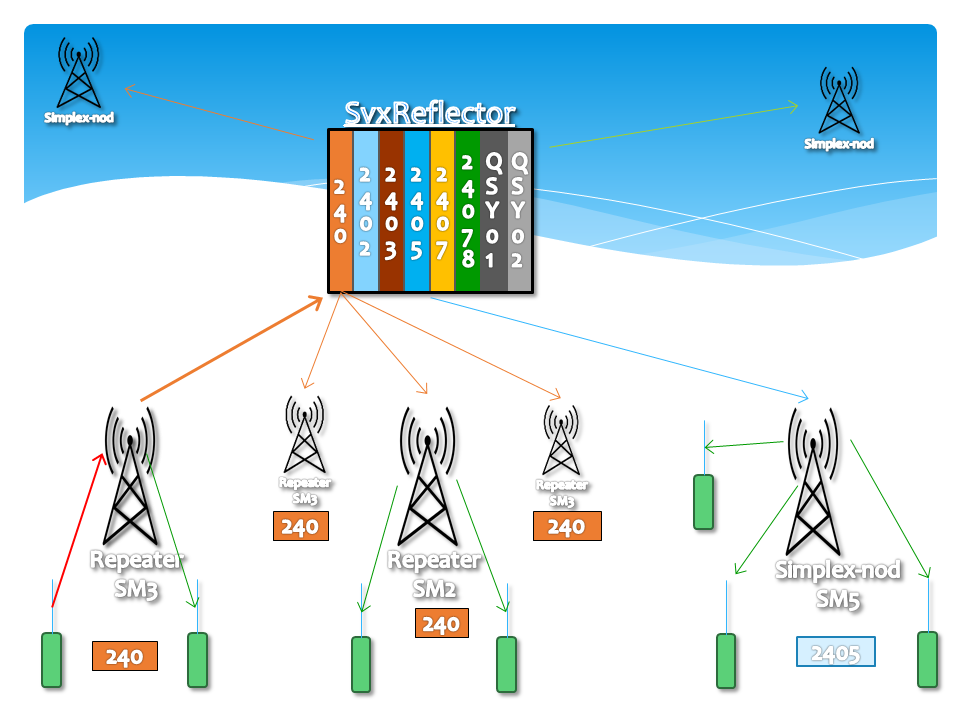
🎯 Network Fundamentals
Repeaters can monitor multiple talk groups, with selection controlled by DTMF commands or Subton (CTCSS) codes.
Voice groups are selected manually or activated automatically via local default settings upon startup.
A repeater can be active on only one Talk Group at a time, ensuring clear, organized traffic flow.
Incoming traffic on monitored groups automatically activates the repeater, but cannot break into active QSOs.
The entire system can be monitored in real time via SvxPortal (this website).
📊 Static Monitoring Structure
All repeaters and simplex nodes in the network continuously monitor:
- 240 National coverage (entire Sweden)
- District District Number Group (e.g., 2405 for SM5)
- Local Local talkgroup (e.g., 240515 for Eskilstuna)
- Nearby Nearby Repeaters & Districts
- Cluster Cluster talkgroups (e.g., 24078 for SK7RFL)
🎛️ Selecting a Talkgroup
Choose your talkgroup using DTMF or Subton (CTCSS). If no activity occurs on the selected group, the system returns to idle mode after 30 seconds and waits for activity on monitored groups. You'll hear a small "FLIRRP" when the repeater returns to default.
📱 DTMF Selection
To activate Talk Group 2405 using DTMF, press:
The repeater will announce the switch to Talk Group 2405 when you release PTT.
🎵 Subton / CTCSS Selection
A list of talkgroups selectable with Subton is available on the SvxPortal.
To activate Talk Group 2405 with Subton, select 91.5Hz. After transmission, the repeater announces the talkgroup.
⚠️ Note: Subton activation only works from idle mode, not during an active QSO.
View CTCSS assignments for all repeaters
↔️ QSY (Frequency/Talkgroup Changes)
During an active QSO, QSY commands allow all active nodes to move to a different talkgroup together.
| Command | Description |
|---|---|
| 92 # | QSY to a randomly selected talkgroup (chosen by reflector server) |
| 92nnn # | QSY to a specific talkgroup (e.g., 922405 #) |
| 93 # | Follow the latest QSY (if you missed it or didn't press PTT in time) |
Calls begin on the broad national group (240) to gather participants. Once everyone is on frequency, use 92 # to move all active nodes to a temporary, less-congested talkgroup. The national channel becomes available for new calls.
An automatic QSY to Talkgroup 240 occurs after 5 minutes on temporary groups.
Newer SvxLink versions: When a QSY occurs, the repeater announces "QSY 24099nn pending". If you press PTT within 15 seconds, you automatically follow. Otherwise, you'll hear "QSY [24099nn] ignored".
- 922405 # = QSY (moves ALL active nodes)
- 912405 # = Local selection (moves only YOUR node)
📋 Complete DTMF Command Reference
| Command | Example | Description |
|---|---|---|
| 91nnn# | 912405 # | Activate Talk Group (e.g., 2405) |
| 91# | — | Jump back to previously selected talkgroup (or default on SK7RFL, SK7RN, SK5BN) |
| 92# | — | QSY all active nodes to random talkgroup (auto-selected by Reflector) |
| 92nnn# | — | QSY all active nodes to specific talkgroup |
| 93# | — | Follow QSY (if not acknowledged) or press PTT within 15 seconds after announcement |
| 94nnnn# | 9424070# | Temporarily add extra talkgroup monitoring |
| 910# | — | Instantly disconnect current talkgroup (no 30-sec wait) |
| 9*# | — | Get information/status about current talkgroup |
| 1# | — | Activate the Parrot (echo test) |
| 2# | — | Activate EchoLink |
| 5# | — | Weather (METAR) for nearby airport |
| 0# | — | Help menu |
📢 SSA Bulletins
SSA bulletins are transmitted locally on each repeater, with two network-wide broadcasts:
ℹ️ Additional Information
- 🗺️ Subtone Mapping: Subtone-to-Talkgroup mapping follows SSA's CTCSS list. The secondary tone (Secondary 1) for each district maps to that district's talkgroup.
- ⚡ Quick Disconnect: Press 910 # (Talkgroup 0) to instantly disconnect without waiting 30 seconds—useful if you select the wrong group.
- 🔒 Single Group Limitation: You cannot activate multiple talkgroups simultaneously. Once a specific talkgroup is active (e.g., TG2403), traffic from other groups is blocked until the current traffic stops and 30 seconds have passed.
- 🔄 DMR Compatibility Note: SvxReflector is not connected to DMR/Brandmeister, but uses similar naming conventions and talkgroup numbers.
📚 Resources & Community
Create an account on this portal to access advanced tools under My Stations
Generate custom configurations for your repeater